Help overview/Payments
Payments FAQ
Levitio always shows you the fee transparently in advance. Donations use the same 5% / 3% rate as other Levitio Pay payments.
Price and fees
How much does Levitio Pay cost and how is the fee calculated?
Levitio always shows you the fee transparently in advance.
You can find the Levitio Pay fee in your account Settings in the Subscription section. You can always find the current fee amount in the Levitio price list.
If the rate decreases from a certain amount, the lower rate applies only to the portion of the price above that threshold.
Example: With a rate of 5% up to CZK 1,500 and 3% above CZK 1,500, the fee for a CZK 2,000 payment is CZK 90 in total:
- 5% of CZK 1,500 = CZK 75,
- 3% of CZK 500 = CZK 15.
If you change the price for a specific member, the fee is calculated from their actually set amount.
Is there a different fee for donations?
No. Donations use the same Levitio Pay fee as other payments: 5% on the portion up to CZK 1,500 and 3% on the portion above CZK 1,500.
How to set the price?
The decision is up to the organization.
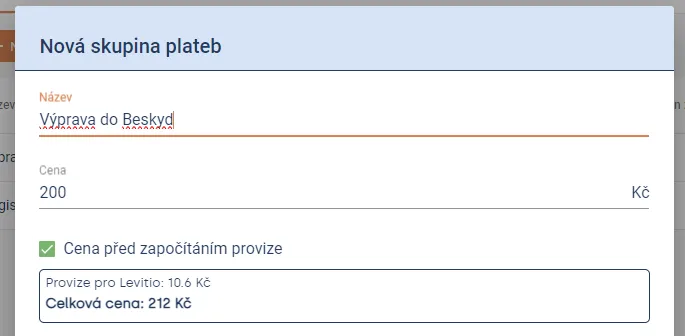
If you select the Price before the fee is included option, Levitio calculates the price for parents so that the organization receives the amount you entered after deducting the fee.
If you don’t select this option, the entered price will be the final price for parents and the fee will be deducted from it.
You can also set the price so that part of the fee is borne by the organization and part is included in the price for parents.
Can a different price be set for individual members?
Yes. You can adjust the price for individual members, for example due to a sibling discount, partial participation, or an individual agreement.
The Levitio Pay fee is then calculated from the adjusted price of the specific member.
How to communicate the Levitio fee to parents?
It depends on how the unit normally communicates the price of its events and activities.
The Levitio Pay fee can be part of the total price just like other costs associated with an event. If you present a detailed budget to parents, you can list it, for example, as:
Processing and management of online payments through Levitio Pay.
It is also appropriate to talk about Levitio in the context of all other features that save the unit time and help leaders focus on educating children.
Payment setup and payer
What if we use multiple bank accounts?
When creating a payment group, you select which approved bank account the money should be sent to. You also see the selected account in the payment detail.
Can the organization be the payer?
Yes. As payer, a parent/member can designate the organization. This is useful, for example, when an employer or insurance company reimburses the payment later, because Levitio issues a document with the organization’s entered details.
What is a custom identifier for?
In addition to the name, you can also mark a payment with a custom identifier. This is useful, for example, for an internal event number or a designation agreed with accounting. The identifier then appears on related documents.
Sending received payments
How are received funds sent to the organization?
For each payment group, you can choose one of two methods:
Automatic settlement Levitio regularly sends received funds to the organization’s selected bank account.
Settlement on request Received payments accumulate until you request their settlement. Multiple payments for the same payment group can then arrive as one combined amount with one document.
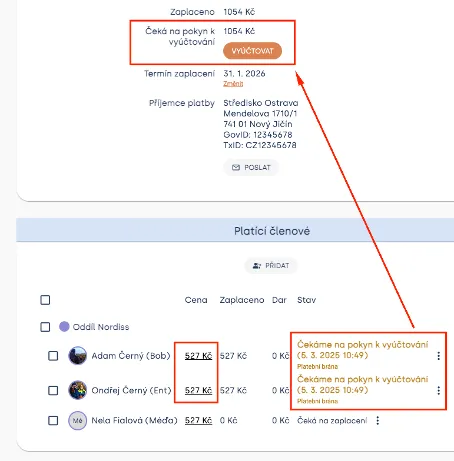
Payments are sent based on a unit settlement request (either manually or regularly according to settings). Funds for a trip always arrive SEPARATELY (e.g. for 10 children paying for a trip) and separately, for example, for other transactions (e.g. registration or another trip). If the payment also included donations (Fundraising), all donations also arrive in a separate payment.
Example:
Each payment has its own unique variable symbol, according to which you can look up in Levitio which specific payments a variable symbol contains.
| Who | Price | Levitio Pay fee | Sent to organization | VS | |
| Mountain trip | Jan Novák | CZK 550 | CZK 27.50 | CZK 522.50 | 15678 |
| Mountain trip | Petr Hon | CZK 550 | CZK 27.50 | CZK 522.50 | 15678 |
| Registration fee | Jan Novák | CZK 1300 | CZK 65.00 | CZK 1235 | 15678 |
Documents, exports, and accounting
What is the difference between parent confirmation and accounting document?
After successful payment, the parent receives confirmation of their payment.
After sending money to the organization, Levitio creates an accounting document and summary intended for the organization and its accounting. These are therefore two different documents.
Where can I find documents?
You can find documents in Finance → Documents. According to your permissions, you can view them in a specific unit / club or in summary via Organization > Documents. You can also see transactions across units in Organization > Payment transactions. A bank account is not added at the organization level.
Can documents be sent to the accountant automatically?
Yes. For a payment group, you can enter email addresses to which Levitio will send created documents.
You can also set a default accountant email in unit settings in the Finance section so that newly created payment groups automatically inherit it.
Accounting, allocation, and payment export
Levitio allows exporting completed payments to Excel.
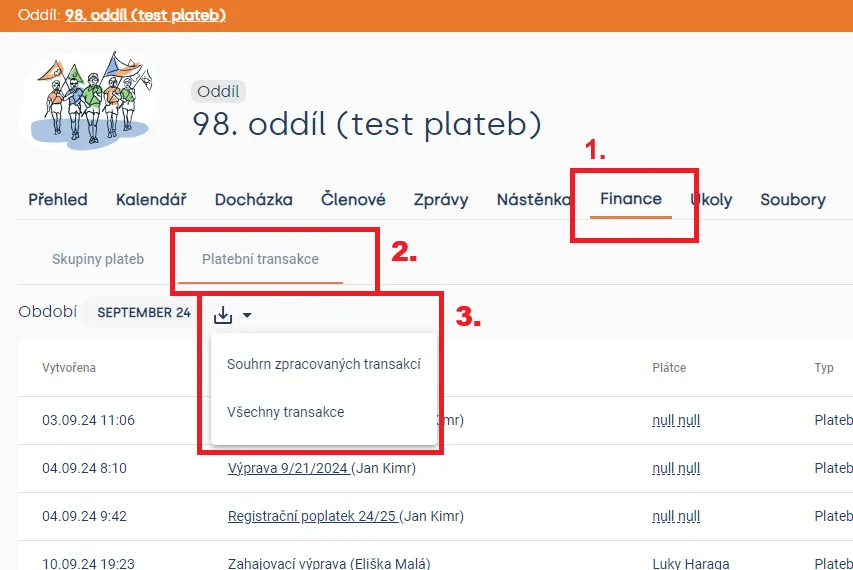
When using the Processed transactions summary export, Levitio generates a clear Excel file where transactions are divided by units, payment groups, and whether they were cashless (through our payment gateway) or whether you received money in cash.
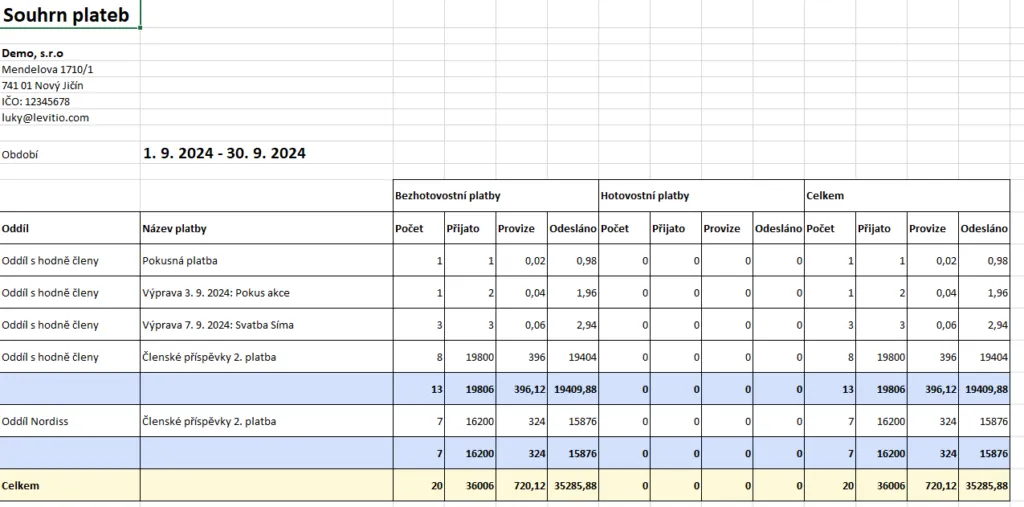
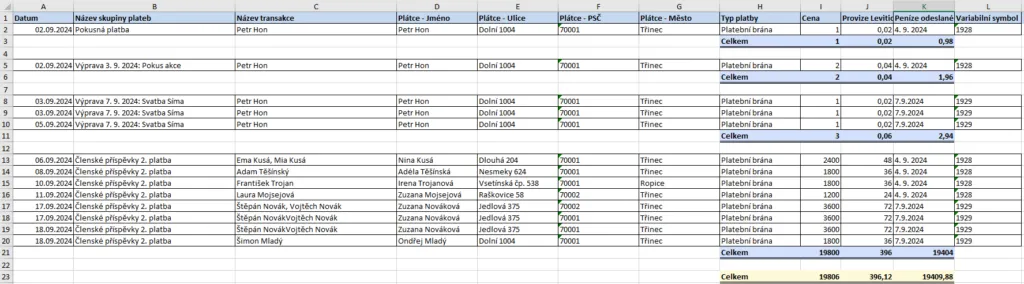
Here you can download a sample payment summary file:
Download
For each payment that Levitio sends to the unit, we automatically issue an accounting document. This makes accounting easy.
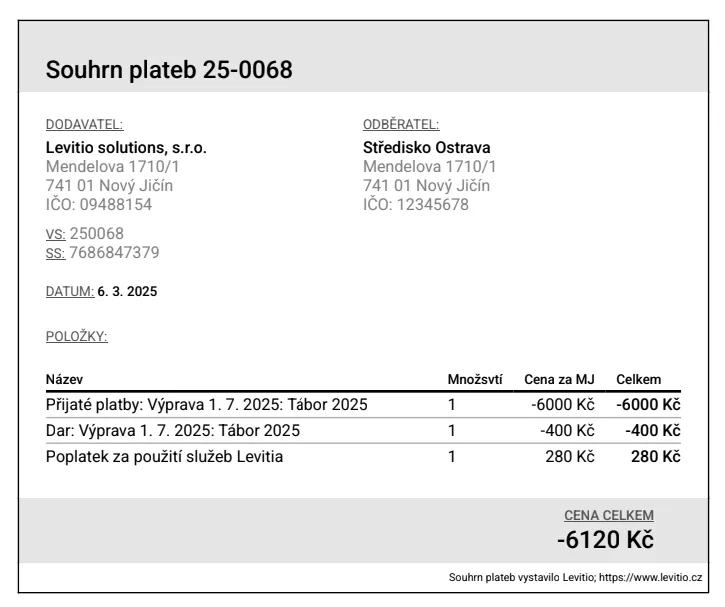
Sample accounting document
Changes, refunds, problems
Can a payment be refunded directly through Levitio Pay?
No. A refund cannot be made directly through Levitio Pay. If you need to return money to a parent, make the refund outside Levitio from the unit / club bank account.
Levitio Pay does not take part in returning payments that have already been sent.
What happens after the payment deadline passes?
After the deadline, the parent can no longer complete the payment. They must contact the leader and agree on further steps.
The leader can easily make the payment available again and allow the parent to pay it subsequently.
Related articles
Payments
Levitio Pay: payments
Levitio Pay helps units and clubs collect payments from parents and members. The bank account is set in the specific unit.
Payments
Donation campaigns / Crowdfunding
Levitio lets you collect donations and thereby increase the unit's funds. Donations use the same 3–5% Levitio Pay fee.
Payments
Adding a bank account
To accept payments through Levitio Pay in a specific unit / club, you must first add and have a bank account approved.
Getting started
Getting started
Levitio is used by organizations, leaders, members, and parents. This guide walks you through creating an organization and the first steps.
For parents
Levitio for parents
Parent and member portal: events, payments, noticeboard, and children's details in one place. You enter the portal with a personal link, without registration or a password.